Batch Evaluation
The batch evaluator runs the full library of historical balloon launches in
evaluation/launches.json against the current state of the codebase, tags
the results with the current git hash, and writes everything — metrics CSV,
interactive HTML report, per-launch comparison plots, and trajectory maps —
into a self-contained timestamped folder.
Useful for:
establishing a baseline before changing the model or tuning hyperparameters,
measure the effect of a code change across many flights at once,
Every batch is reproducible from batch_info.json (git hash, branch, commit
message, and a snapshot of launches.json are all stored alongside the
results).
For a single-flight workflow with finer-grained per-flight tuning, see
Single Evaluation. All assumptions in
Calculations and Assumptions (phase detection, smoothing, NaN handling,
reforecast construction, sunset detection) apply identically to batch runs —
each launch is processed by the exact same evaluation.evaluate.BalloonEvaluator.
System Overview
The system lives entirely in the evaluation/ directory:
File |
Purpose |
|---|---|
|
Master metadata file — one entry per historical launch |
|
Template you can copy to bootstrap your own |
|
Runs all launches and writes a timestamped batch folder |
|
Auto-parametrized validation that every file referenced in |
Step 1 — Populate launches.json
launches.json is the single source of truth for all historical flights.
Each entry describes one balloon launch and points to its trajectory and
forecast files.
Required fields (the batch will skip the launch if any are missing):
Field |
Type |
Description |
|---|---|---|
|
string |
Balloon identifier (e.g. |
|
string |
Launching organization (e.g. |
|
string |
UTC launch time in ISO format: |
|
number |
Simulation duration in hours. Set this manually — APRS trackers often lose signal near the ground at launch and landing, so auto-detection is unreliable. Pad by 1–2 hours past expected landing. |
|
string |
Filename only (e.g. |
|
number |
Launch latitude in decimal degrees |
|
number |
Launch longitude in decimal degrees |
|
number |
Ground elevation at launch site in meters (also used as |
|
number |
Payload mass in kg |
|
number |
Envelope mass in kg |
|
string |
|
|
number |
Balloon diameter in meters (sphere) or characteristic length (trapezoid) |
|
string |
Forecast filename (e.g. |
Optional fields (fall back to current config.py defaults if omitted):
callsign, campaign, landing_time, launch_type,
areaDensityEnv, cp, absEnv, emissEnv, Upsilon, and any
earth_properties field (Cp_air0, Cv_air0, Rsp_air, P0,
emissGround, albedo).
Tip
When the campaign field is included, the HTML report groups all
launches that share a campaign name into their own sub-table with its own
campaign-average row (see Batch Summary Table).
Launch Types
The optional launch_type field describes how the SHAB got off the ground.
EarthSHAB’s solar-balloon physics model only describes a self-ascending
solar balloon, so for non-standard deployments the ascent metrics are not
meaningful — see the rules below.
Value |
Meaning |
|---|---|
|
Conventional ground release — SHAB ascends under solar buoyancy alone. Full ascent / float / descent metrics are scored. |
|
SHAB is partially filled with helium so that buoyancy carries it up faster than solar heating alone could. Float and descent are still physically comparable to the model, but the helium-driven ascent rate is not — ascent metrics are reported as N/A for these flights. |
|
SHAB is carried aloft by a separate weather balloon and released above its natural float altitude. After release, the SHAB descends through the air column until it reaches its float, then floats normally before landing. For Grand Slam two evaluator behaviours change:
|
If the field is omitted, the evaluator behaves as if it were "standard".
The compare_batches.py and summary.html reports include a Type
column so you can see at a glance which model assumption was applied to
each row.
Note
launch_type does not change the forward simulation itself —
EarthSHAB still simulates a self-ascending solar balloon either way.
The flag only changes which phase metrics are scored against ground
truth, so non-physical comparisons don’t pollute the per-campaign
averages.
Example entry:
{
  "shab_name": "SHAB14V",
  "organization": "UA",
  "callsign": "SHAB14V",
  "campaign": "Schuler-ABQ",
  "launch_time": "2022-08-22 14:36:00",
  "landing_time": null,
  "sim_time_hr": 14,
  "aprs_file": "SHAB14V-APRS.csv",
  "gfs_file": "gfs_0p25_3h_20220822_12.nc",
  "era5_file": "SHAB14V_ERA5_20220822_20220823.nc",
  "launch_lat": 34.60,
  "launch_lon": -106.80,
  "launch_alt_m": 1000.0,
  "payload_weight_kg": 0.9,
  "envelope_weight_kg": 2.1,
  "balloon_shape": "sphere",
  "balloon_size": 5.8
}
Note
If a launch has both a GFS and an ERA5 forecast file, the batch runner will
produce two separate evaluations — one per forecast type — in the same
launch output folder. Both rows appear independently in summary.csv
and summary.html.
Step 2 — Validate Before Running
Before running a batch, check that all referenced files exist and are correctly formatted:
pytest tests/test_validate_launches.py --spec
The tests are auto-parametrized — adding a new launch to launches.json
instantly adds a full set of validation tests for it.
Step 3 — Run a Batch
Run all launches against the current codebase state:
python -m evaluation.run_batch --note "baseline evaluation"
The --note flag is required. Use it to describe what changed since the
last batch (e.g. "tuned Upsilon coefficient"). The note is stored with the
results so you can remember why each batch was run.
The runner will:
Detect the current git hash, branch, commit message, and dirty flag
Snapshot the original
configstate (so per-launch overrides cannot bleed into each other)Create a timestamped output folder:
evaluation/batches/2026-04-28T1423_a3f9c12/For each launch in
launches.json:validate required fields and file paths,
build a complete config-override dict for each forecast type the launch supports,
run a GFS evaluation and/or an ERA5 evaluation,
write per-launch CSV / PNG / interactive HTML map outputs,
append one summary row per forecast type
Skip failed launches with a full traceback printed to the console — the batch always continues
Write
summary.csv,summary.html, andbatch_info.jsonat the batch level
Console output example:
============================================================
  EarthSHAB Batch Evaluation
  Batch ID : 2026-04-28T1423_a3f9c12
  Note     : baseline evaluation
  Launches : 2
============================================================

── UA_SHAB14V_2022-08-22 ──
  Running GFS...
  [GFS] done

  Running ERA5...
  [ERA5] done

── UA_SHAB1_2020-10-01 ──
  Running GFS...
  [GFS] done

Summary → evaluation/batches/2026-04-28T1423_a3f9c12/summary.csv
Report  → evaluation/batches/2026-04-28T1423_a3f9c12/summary.html
Batch info → evaluation/batches/2026-04-28T1423_a3f9c12/batch_info.json

============================================================
  Batch complete: 2/2 launches succeeded
  Total runtime: 142.3s
============================================================
Output Structure
Each batch produces a self-contained folder:
evaluation/batches/
└── 2026-04-28T1423_a3f9c12/
    ├── batch_info.json           ← git hash, note, runtime, launch status, launches.json snapshot
    ├── summary.csv               ← all metrics, one row per launch × forecast type
    ├── summary.html              ← interactive sortable, color-coded report
    ├── UA_SHAB14V_2022-08-22/
    │   ├── SHAB14V-APRS_GFS_2022_8_22.csv
    │   ├── SHAB14V-APRS_GFS_2022_8_22.png
    │   ├── EVALUATION_SHAB14V-APRS_GFS_2022_8_22.html
    │   ├── SHAB14V-APRS_ERA5_2022_8_22.csv
    │   ├── SHAB14V-APRS_ERA5_2022_8_22.png
    │   └── EVALUATION_SHAB14V-APRS_ERA5_2022_8_22.html
    └── UA_SHAB1_2020-10-01/
        ├── SHAB1-APRS_GFS_2020_10_1.csv
        ├── SHAB1-APRS_GFS_2020_10_1.png
        └── EVALUATION_SHAB1-APRS_GFS_2020_10_1.html
``batch_info.json`` records everything needed to reproduce or understand the batch:
{
  "batch_id": "2026-04-28T1423_a3f9c12",
  "note": "baseline evaluation",
  "git_hash": "a3f9c12",
  "git_branch": "devel",
  "git_commit_message": "Added batch evaluator",
  "git_dirty": false,
  "earthshab_version": "1.3",
  "total_runtime_s": 142.3,
  "per_launch_avg_runtime_s": 71.15,
  "launches_attempted": ["UA_SHAB14V_2022-08-22", "UA_SHAB1_2020-10-01"],
  "launches_succeeded": ["UA_SHAB14V_2022-08-22", "UA_SHAB1_2020-10-01"],
  "launches_failed": {},
  "launches_json_snapshot": { ... full launches.json ... }
}
Note
git_dirty: true means there were uncommitted changes when the batch ran.
Results from dirty batches should be treated as exploratory — commit your
changes before a batch you intend to keep.
Batch Summary Table
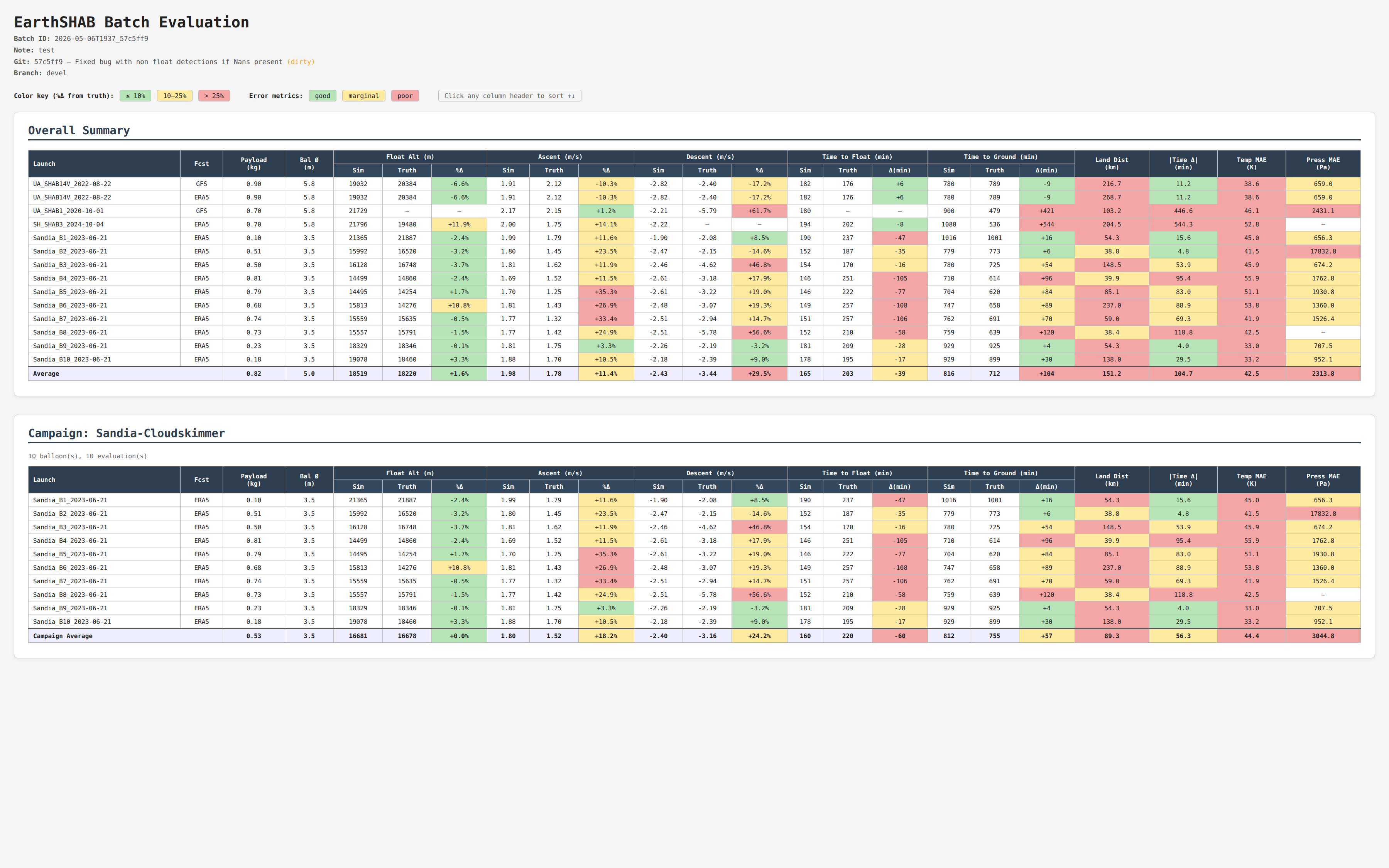
Header
The report header echoes the batch metadata — batch ID, note, git hash / commit message (with a dirty flag when applicable), branch — and the batch runtime: total wall-clock seconds plus the per-launch average.
Tables
The page always contains an Overall Summary table covering every launch ×
forecast pair in the batch. In addition, every distinct value of the optional
campaign field becomes its own Campaign sub-table below — but only if
the campaign contains at least 2 distinct balloons (single-flight campaigns
are suppressed to avoid noise). Each campaign sub-table has its own
Campaign Average footer row.
Columns
Each row represents one launch × one forecast type. Columns are grouped:
Group |
Columns |
|---|---|
Identity |
|
Float Alt (m) |
|
Ascent (m/s) |
|
Descent (m/s) |
|
Time to Float (min) |
|
Time to Ground (min) |
|
End-to-end errors |
|
The averages footer row shows the column-wise mean of all successful rows. Failed launches are shown as a single full-width red row with the failure message and are pinned to the bottom of any sort.
Color coding
The color rules differ between percent-difference cells and absolute-error cells:
Cell type |
Green (≤) |
Yellow (≤) |
Red (>) |
|---|---|---|---|
|
10 % |
25 % |
25 % |
Time-to-float diff (min, abs) |
15 |
45 |
45 |
Time-to-ground diff (min, abs) |
30 |
90 |
90 |
Land Dist (km) |
20 |
50 |
50 |
|Time Δ| (min, abs) |
30 |
90 |
90 |
Temp MAE (K) |
5 |
15 |
15 |
Press MAE (Pa) |
500 |
2000 |
2000 |
Cells with no value (NaN, missing, etc.) display as — and are uncolored.
Tip
Sorting: Click any column header to sort that column’s data. Failed-row entries always sort to the bottom regardless of direction.